Upload or paste rows
Drop a CSV or paste rows directly. GridGuard normalizes the table and finds duplicate signatures fast.
Built for operators
Operational data-quality audit tool
Upload a CSV or paste rows, then GridGuard scans the table, ranks what to fix first, and keeps the cleanup plan attached to your audit history.
4
checks per scan
2
input modes
1
cleanup plan
Live audit preview
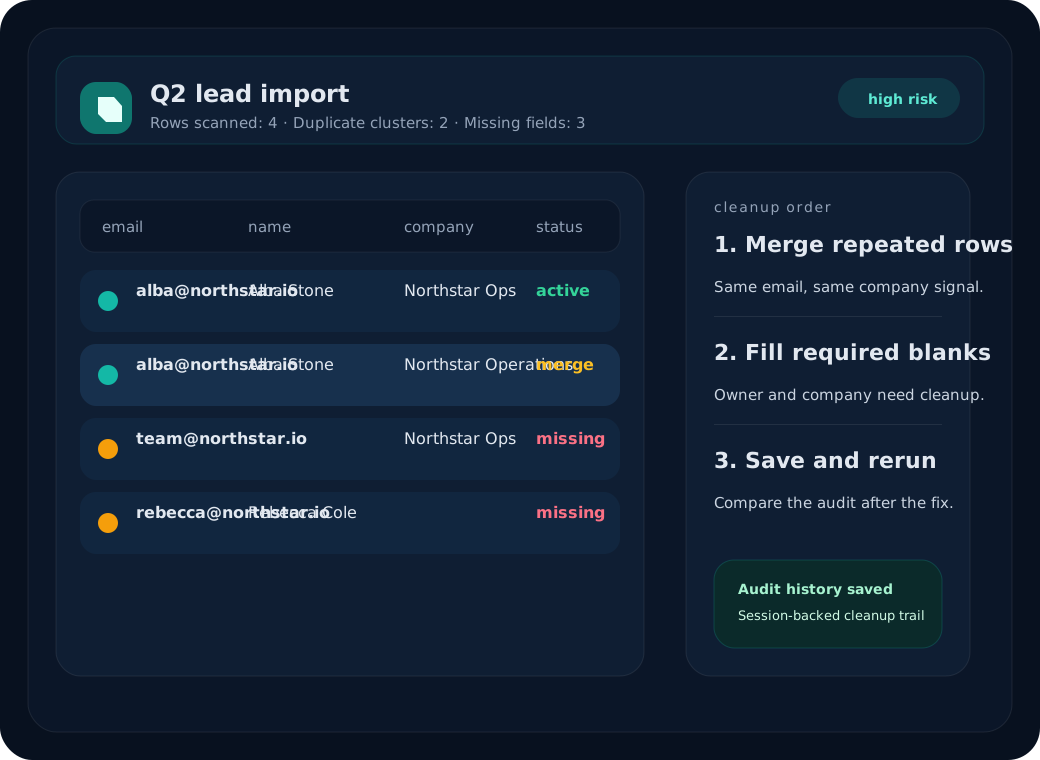
Top issue
Repeated email + company signature
Merge the rows that share the same email first, then re-run the scan.
Missing fields
Owner and company blanks
Fill required fields before downstream syncs move the mess forward.
Saved output
Audit history persists
Each result is stored against the signup session for later comparison.
How it works
GridGuard keeps the first run short enough to finish in a working session, then stores the result so teams can compare changes after cleanup.
Drop a CSV or paste rows directly. GridGuard normalizes the table and finds duplicate signatures fast.
The scan returns a short list of the records to fix first, not a wall of generic findings.
Each audit persists a cleanup plan so operators can compare the before/after on the next pass.
Saved audits stay attached to the signup session, giving teams a durable audit history.
What operators get back
GridGuard is focused on the cleanup moment: duplicate signatures, missing fields, and a clear order for what to fix first.
Prioritize duplicates first
The audit ranks repeated rows by cleanup risk so the best merge candidate comes first.
Keep a durable audit trail
Every scan is stored with the signup session so operators can compare old and new exports.
Pricing
Starter
$19
Weekly audits for small imports and one saved history lane.
Pro
$49
Recurring cleanup checks for teams that live in Airtable and Sheets.
Ready to audit the next import
GridGuard is built for the moment before a messy table goes downstream. Sign up, run a real audit, and keep the result visible for the next cleanup pass.